Summon on us, and Special Effects on the character page

Big one this time 🎉 Every summon banner now has a simulator that plays out the pull the way the game does, sparks, crack, reveal and all, and keeps the best summons of the day for bragging rights. Character art learned a new trick too, and character search picked up two small words you type a lot.

New 🎉
  • The Summon Simulator 🔥 Every summon banner that consumes Dragon Stones has a rainbow "Summon Simulator" button at the top. Charge the Kamehameha, watch the reveal and the results screen just like in the game, then roll again when the pull was rubbish. It likely was, because the odds are the banner's real rates. Sorry.
  • Every simulated summon gets its own link, so you can share a pull with your friends. A summon you made while not signed in can be claimed once you sign in.
  • Each banner page shows its Best Summons of today and of all time, and the simulator tells you when your pull tops either list. These bests are scored by rarity, featured and exclusive draws.
  • Characters with a Special Effect from Dokkan Frontier can show it on their art. On a character page, pick "Special Effect" from the "Effect" dropdown on the art card: URs get their new animated overlay, LRs get their quote overlay.
  • Typing "eza" or "seza" in the search on the characters page now filters for characters that can be Extreme Z-Awakened or Super Extreme Z-Awakened, the same way type and rarity words already do.

Found a summon that plays out wrong, or a Special Effect that does not show? Reply below or tell us on the Discord server 🙏

Potential Skill Nodes with Options

Banner for Potential Skill Nodes with Options


In this kind of nodes, you can decide which Potential Skill
to learn among several options.
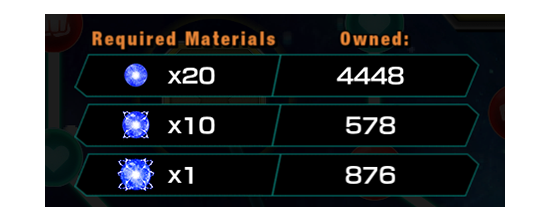

Banner for Potential Skill Nodes with Options


As for each optional Potential Skill in that node, the required
materials are the same, but the number of levels to be raised
may be different
.

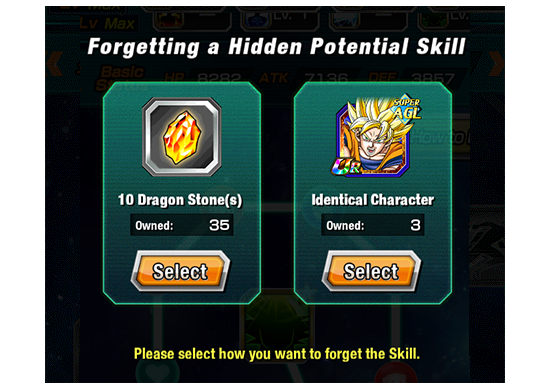
You can tap on the node again to "forget" the learned
Potential Skill.

After you forget the learned Potential Skill, that node will be
restored to its default.


To forget a learned Skill, you must consume Dragon Stones
or an identical character.

The Potential Skill nodes with options are marked with a star.

Banner for Potential Skill Nodes with Options

CampaignNewsMar 28, 2014, 10:00 AM GMT+0

Comments

No comments have been posted yet.
DOKKAN.FYI

With by CapnMZ

Dragonball Z Dokkan Battle © BIRD STUDIO / SHUEISHA, TOEI ANIMATION & ©2015 BANDAI NAMCO Entertainment, Inc. Developed by Akatsuki, Inc.

This website serves solely for informational purposes. The author is not affiliated with any of the aforementioned parties.

Amazon and the Amazon logo are trademarks of Amazon.com, Inc. or its affiliates.

Support the cause
Socials
RIPoLegend