A faster team builder and a smarter search

Busy weeks! The team builder got the biggest shake-up: it responds right away instead of making you wait (...unless the server is overloaded 😅), and the results are better too. Search learned a few new tricks, and your box
got an upgrade.

New 🎉
  • Search finds a character by any of its Transformation Forms, so a transformed character's name gets you the character it belongs to. Nicknames work too, ss, ssbkk and ui among plenty of others, on the characters page.
  • Character pages can show Hidden Potential stats at the most common unlock percentages, not just all-or-nothing.
  • Character Box Settings has a new "Add awakening paths automatically" switch in your profile. With it on, adding a character to your box also adds every form it awakens from and into. For the characters you already own, "Sync Awakening Paths" catches the whole box up in one go.
Improved ⚡
  • The team builder is quicker at every step. Placing, swapping and removing a character shows instantly, filters no longer fire a reload per click, and a build that used to crawl now lands in seconds ⚡
  • Autobuild respects the Categories and Link Skills filters you have set, so it stops handing you characters you filtered out.
  • The builder is also smarter about Slot 1: it now measures how much damage a character actually prevents there instead of adding up loosely related numbers.
  • The news section reads better, with a proper grid and the comments sitting beside the article on wide screens.
  • The side menu got hover intent, a pin toggle and tighter rows, so it stops opening when you only meant to pass by.
Fixed 🐛
  • Panel Missions update again. New ones had stopped coming through.
  • On a character page, EZA characters sometimes showed slightly off stats at level 140. The numbers add up now.
  • Also on a character page: the Transformation button no longer lights up when you press Exchange, and an exchange partner no longer turns up inside the transformation cycle.
  • Some Super Attacks belonging to recently released characters rendered as a mostly black screen. The videos behind them were missing, and they are back.

Something still off, or something you want next? 👀 Reply to this article or come say hello on the Discord server.

Global Campaign! Porunga Dragon Ball Campaign!
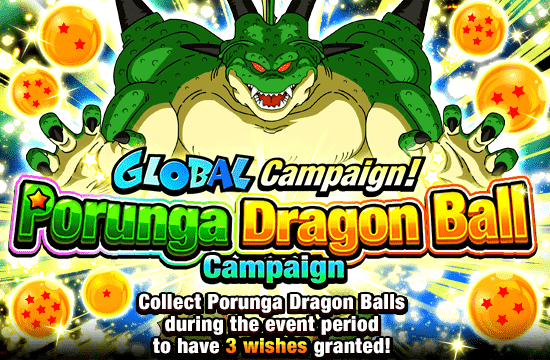
Banner for Global Campaign!
Porunga Dragon Ball Campaign!


= Event Period =

Sat. 8/29 09:00 - Sat. 9/12 14:59 UTC

The Porunga Dragon Balls
will appear in the game!


Porunga can be summoned up to 2 times
during the campaign period!
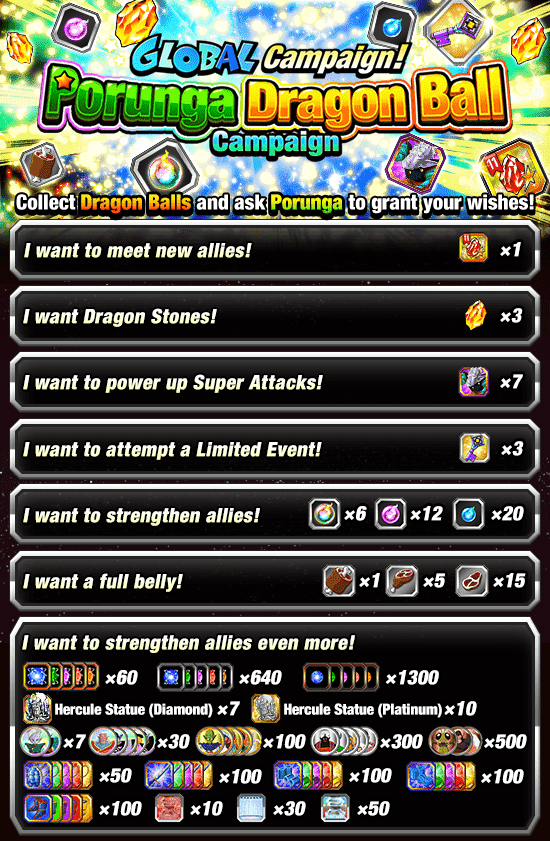

Banner for Global Campaign!
Porunga Dragon Ball Campaign!


Depending on the wishes you select, you can
get awesome items such as the Treasure Item
"Select Character Dragon Stone 11",
Dragon Stones and Guidance Keys!

Please check the relevant announcement
for more details on the Treasure Item
"Select Character Dragon Stone 11"!

The periods in which Porunga can be summoned are as follows:
1st time: Sat. 8/29 09:00 - Sat. 9/12 14:59 UTC
2nd time: Sat. 9/5 09:00 - Sat. 9/12 14:59 UTC

* Porunga can only be summoned again during the specified
period after your previous wishes have been granted.

* Depending on when you join the event, you may not be
able to summon Porunga the maximum number of times.

Collect all 7 Porunga Dragon Balls by following the hints
and ask Porunga to grant your wishes!

= The 7 Hints =
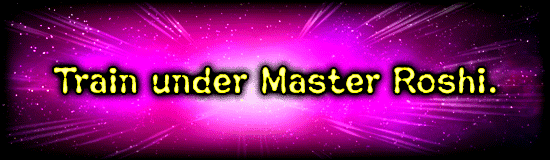

Banner for Global Campaign!
Porunga Dragon Ball Campaign!


Banner for Global Campaign!
Porunga Dragon Ball Campaign!


Banner for Global Campaign!
Porunga Dragon Ball Campaign!


Banner for Global Campaign!
Porunga Dragon Ball Campaign!


Banner for Global Campaign!
Porunga Dragon Ball Campaign!


Banner for Global Campaign!
Porunga Dragon Ball Campaign!


Banner for Global Campaign!
Porunga Dragon Ball Campaign!


= Notes =

* A total of 14 Porunga Dragon Balls will show up
in the game during the event period.

* Porunga can be summoned up to 2 times during
the event period.

* Please note that the Porunga Dragon Balls will be
removed from the "Shenron" page after the event ends
and rewards will become unobtainable. The "Shenron"
page can be accessed by navigating the following path:
"Home Screen" --> "Team" --> "Shenron".

* You can check the possible locations of the Porunga
Dragon Balls at the "Shenron" page.

* You can only obtain Porunga Dragon Balls that are
sensed by the Dragon Radar.

* After summoning Porunga, the Dragon Radar will not
pick up any signal of the Porunga Dragon Balls and
will no longer show hints.

* Please note that the event content and dates are
subject to change without prior warning.

We hope you continue to enjoy playing
Dragon Ball Z Dokkan Battle!

CampaignNewsAug 29, 2026, 9:00 AM GMT+0

Comments

No comments have been posted yet.
DOKKAN.FYI

With by CapnMZ

Dragonball Z Dokkan Battle © BIRD STUDIO / SHUEISHA, TOEI ANIMATION & ©2015 BANDAI NAMCO Entertainment, Inc. Developed by Akatsuki, Inc.

This website serves solely for informational purposes. The author is not affiliated with any of the aforementioned parties.

Amazon and the Amazon logo are trademarks of Amazon.com, Inc. or its affiliates.

Support the cause
Socials
RIPoLegend